
If you are new to VPNs, choosing the right one can feel confusing, overwhelming,
and even risky. Many VPN comparison pages assume you already understand technical
terms, pricing structures, and advanced settings — most beginners do not.
This guide is different. It is written specifically for first-time VPN users who
want a solution that is easy to install, simple to use, and reliable from day one.
No jargon. No unnecessary features. No complicated setup.
A VPN (Virtual Private Network) helps protect your privacy, secure your internet
connection, and safely access content when using public Wi-Fi, traveling, or
streaming. Consumer protection groups and digital privacy organisations
consistently recommend VPNs as a basic online safety tool — especially for
non-technical users.
We tested beginner-friendly VPNs across Windows, macOS, Android, iOS, and Firestick
devices, focusing only on what matters most to new users:
- One-click setup with minimal configuration
- Clear apps with simple, beginner-friendly interfaces
- Reliable performance for everyday browsing and streaming
- Strong privacy policies supported by independent audits
- Affordable long-term pricing without confusing renewal traps
This guide ranks the best VPNs for beginners in 2026, explains how
VPNs work in plain English, and helps you choose the right option based on your
device, budget, and goals.
If your main reason for using a VPN is streaming or sports access, you may also
find these guides useful:
Best VPN for Streaming,
Best VPNs for Netflix, and
Best VPNs for Live Sports Streaming.
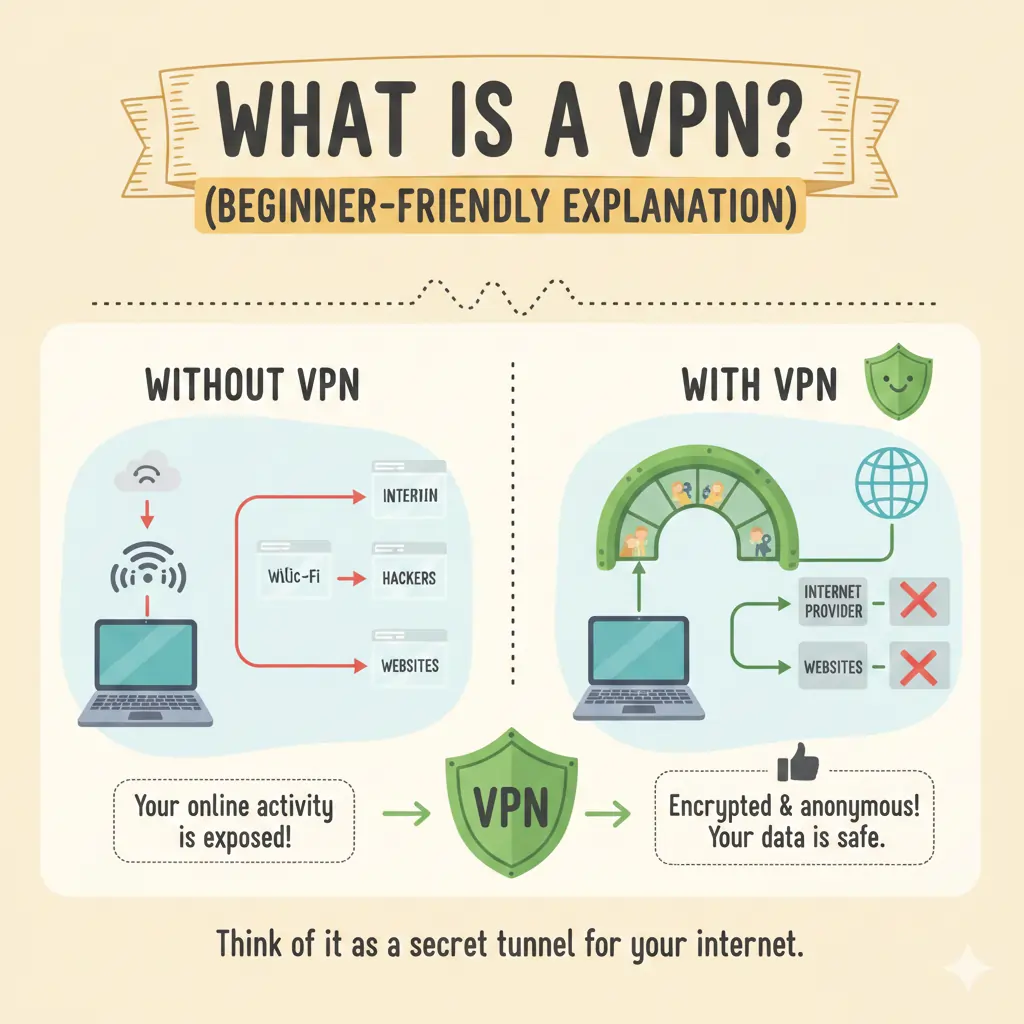
What Is a VPN? (Beginner-Friendly Explanation)
A VPN, short for Virtual Private Network, is a simple tool that protects your internet connection and hides your real location online. For beginners, the easiest way to understand a VPN is this: it creates a secure, private tunnel between your device and the internet.
When you connect to the internet without a VPN, your internet provider, websites, advertisers, and sometimes public Wi-Fi networks can see where you are and what you are doing online. This becomes especially risky when using cafés, airports, hotels, or shared networks.
A VPN changes this by routing your internet traffic through a secure server before it reaches the wider web. As a result:
- Your real IP address is hidden
- Your location appears as the VPN server instead
- Your data is encrypted so others cannot read it
For beginners, this protection works automatically. You do not need to configure advanced settings or understand technical terms. You simply open the app, press connect, and the VPN does the rest.
Why Beginners Use a VPN
Most people do not start using a VPN for technical reasons. Beginners usually install a VPN because they want to:
- Stay safe on public Wi-Fi
- Protect personal data from tracking
- Access streaming services while traveling
- Reduce intrusive ads and ISP monitoring
- Secure everyday browsing without complexity
If your main goal is streaming, you may want to compare beginner-friendly options in our Best VPNs for Streaming guide. If privacy is your top concern, our Best No-Log VPNs breakdown explains which services collect the least data.
What a VPN Does Not Do
It is equally important to understand what a VPN does not do, especially for first-time users:
- A VPN does not make you completely anonymous
- A VPN does not protect you from malware by default
- A VPN does not give you free access to paid services
However, when combined with good browsing habits, a reputable VPN dramatically improves online safety and privacy for beginners and non-technical users.
In the next section, we explain what beginners should look for in a VPN and which features actually matter — without the marketing hype.
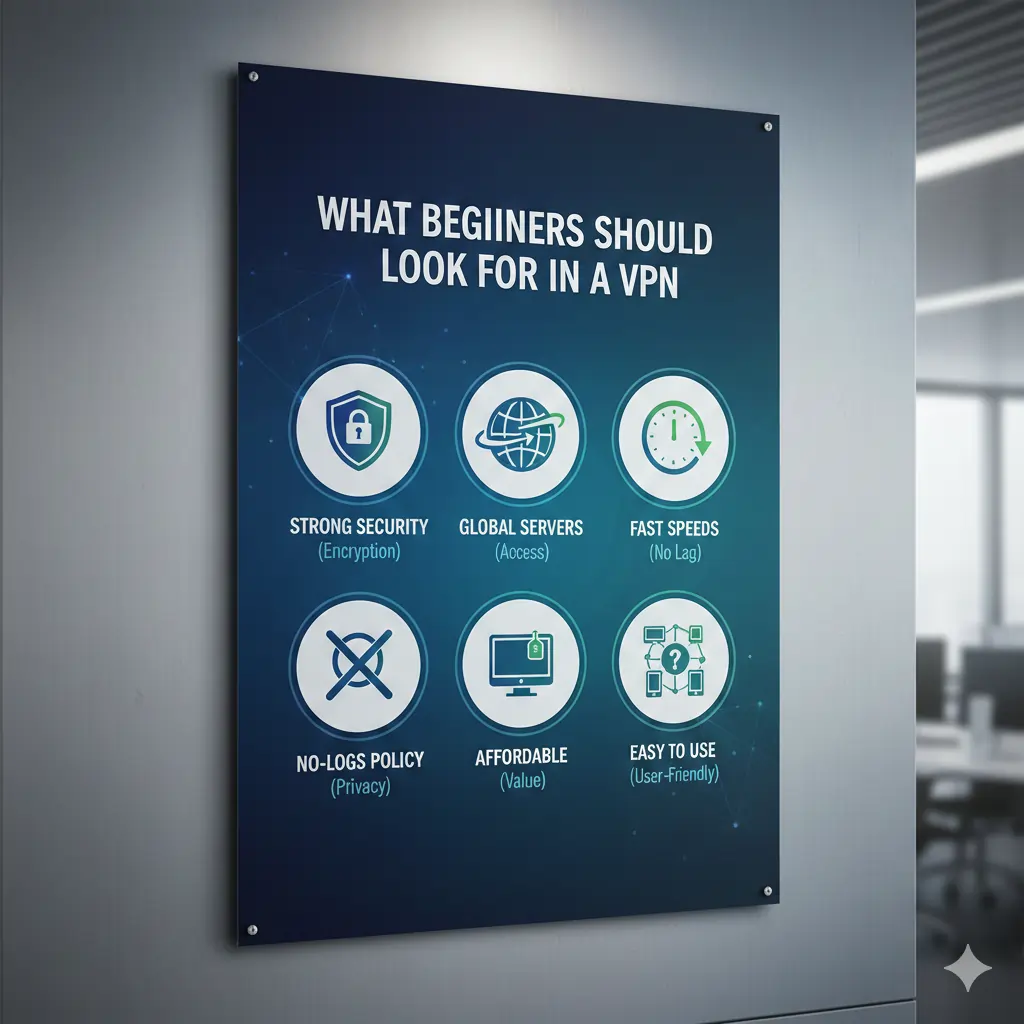
What Beginners Should Look for in a VPN (And What to Ignore)
Most VPN comparison pages overwhelm beginners by listing dozens of technical
features. In reality, first-time VPN users only need a small number of things
to have a good experience. Everything else is optional — and often confusing.
Below are the only features that actually matter for beginners in 2026,
followed by features you can safely ignore.
1. Simple Apps With One-Click Connection
The most important feature for beginners is ease of use.
A good beginner VPN should work immediately after installation,
without requiring configuration or technical knowledge.
The best beginner-friendly VPNs use large connect buttons,
automatic server selection, and clean layouts that look consistent
across Windows, macOS, Android, iOS, and Firestick.
Providers such as NordVPN, Surfshark, and ExpressVPN
consistently perform well here, which is why they appear across
multiple beginner-focused guides on this site.
2. Strong Privacy With a No-Logs Policy
Beginners do not need to understand encryption algorithms,
but they do need a VPN that does not record browsing activity.
A true no-logs VPN does not store:
- Websites you visit
- Files you download
- Your real IP address
- Connection timestamps tied to your identity
We prioritize providers that publish independent audits
and operate under privacy-friendly jurisdictions.
These are covered in more detail in our
Best No-Log VPNs guide.
3. Reliable Performance for Everyday Use
Beginners often assume VPNs are slow.
With modern protocols such as WireGuard, this is no longer true.
A beginner VPN should:
- Load websites without noticeable delay
- Stream video without constant buffering
- Remain stable on public Wi-Fi networks
Speed matters less than consistency.
A slightly slower but stable VPN is far better for beginners
than a fast service that disconnects or requires troubleshooting.
4. Fair Pricing and Clear Refund Policies
Beginners should avoid VPNs with complicated pricing tiers,
unexpected renewals, or unclear refund terms.
All beginner VPNs recommended on this page include
clear money-back guarantees, allowing you to test the service
risk-free before committing long term.
If cost is your main concern, compare beginner-friendly options in our
Best Cheap VPNs guide.
Features Beginners Can Safely Ignore
Many VPNs advertise advanced tools that are unnecessary for first-time users.
These features often complicate the app without improving safety.
- Manual protocol switching
- Custom encryption cipher selection
- Multi-hop or double VPN routing
- Dedicated IP addresses
- Port forwarding
These options are useful for advanced users,
but beginners are better served by VPNs that work well
without touching any settings.
In the next section, we rank the best VPNs for beginners
based on real-world usability, not marketing claims.

Best VPNs for Beginners at a Glance (2026)
If you want a VPN that is easy to use and works immediately, the providers below consistently perform best for beginners. Rankings are based on setup simplicity, app clarity, reliability, and overall value for first-time users.
| Rank | VPN Provider | Best For Beginners | Ease of Use | Devices Supported | Guide |
|---|---|---|---|---|---|
| #1 | NordVPN | Best overall beginner VPN | Very Easy (one-click) | Windows, macOS, iOS, Android, Firestick | Read Review |
| #2 | Surfshark | Best budget VPN for beginners | Very Easy | All major devices, unlimited connections | Read Review |
| #3 | ExpressVPN | Simplest interface overall | Extremely Easy | Windows, macOS, iOS, Android, routers | Read Review |
| #4 | IPVanish | Multiple devices & Firestick users | Easy | Unlimited connections | Read Review |
| #5 | PureVPN | Entry-level and casual users | Easy | Desktop, mobile, smart TVs | Read Review |
These VPNs were selected because they work well without manual configuration. You install the app, press connect, and browse securely.
If your primary goal is streaming, see our Best VPNs for Streaming. If you plan to use a VPN on a TV or Firestick, our Best VPNs for Firestick guide covers device-specific setup.
In-Depth Reviews: Best VPNs for Beginners (2026)
The VPNs below were tested specifically from a beginner’s perspective. We focused on installation speed, interface clarity, reliability after first launch, and how well each service performs without requiring advanced settings or technical knowledge.
NordVPN — Best Overall VPN for Beginners
NordVPN is the most well-rounded option for beginners who want strong privacy, excellent performance, and apps that work immediately. Its interface is clean, modern, and consistent across desktop, mobile, and TV-based devices.
From a first-time user perspective, NordVPN removes friction. After installation, the app automatically recommends the fastest nearby server. Connecting requires a single click, and the VPN remains stable even on public Wi-Fi and shared networks.
NordVPN’s no-logs policy has been independently audited multiple times, which is especially important for beginners who may not be comfortable evaluating privacy policies on their own. Performance is consistently strong for browsing, streaming, and everyday internet use.
Best for: Beginners who want a reliable, “install and forget” VPN
Not ideal for: Users looking for a free VPN
Surfshark — Best Budget VPN for Beginners
Surfshark is an excellent choice for beginners who want strong value without sacrificing ease of use. Despite its lower price, the apps are modern, intuitive, and easy to navigate across devices.
A major advantage for beginners is unlimited device support. You can install Surfshark on phones, laptops, tablets, smart TVs, and Firestick devices without worrying about connection limits.
Surfshark automatically selects optimal servers and works well without manual configuration. Streaming performance is reliable, and everyday browsing remains fast and stable.
Best for: Budget-conscious beginners and multi-device households
Not ideal for: Users who want the absolute simplest interface
Read the full Surfshark review
ExpressVPN — Simplest VPN Interface for Beginners
ExpressVPN is often recommended to beginners because of its extremely clean and minimal interface. The apps look nearly identical across platforms, which reduces confusion for first-time users.
Setup is fast, and the main screen features a single large connect button. Server selection is optional rather than required, making ExpressVPN ideal for users who want zero decision-making.
ExpressVPN performs well for streaming and general browsing, but it is typically more expensive than other beginner-friendly options.
Best for: Users who want the simplest possible VPN experience
Not ideal for: Price-sensitive beginners
Read the full ExpressVPN review
IPVanish — Best for Multiple Devices & Firestick
IPVanish is a practical option for beginners who plan to use a VPN across many devices, including Firestick and Android TV. The apps are straightforward, and setup is uncomplicated.
The service allows unlimited simultaneous connections, which makes it appealing for households where multiple users want basic VPN protection on different devices.
Streaming reliability is more variable than with top-ranked providers, but performance for browsing and general use is stable.
Best for: Multi-device households and Firestick users
Not ideal for: Streaming-focused beginners
PureVPN — Entry-Level VPN for First-Time Users
PureVPN is suitable for beginners who want basic privacy protection at a lower cost. The interface is simple, and installation is quick.
Performance is adequate for browsing and casual streaming, though reliability can vary during peak hours. For users testing VPN usage for the first time, PureVPN can be a reasonable entry point.
Best for: First-time users testing VPNs
Not ideal for: Heavy streaming or advanced use
For stricter privacy comparisons, see our Best No-Log VPNs guide.

Pros and Cons of Beginner VPNs
Every VPN has strengths and limitations.
For beginners, the goal is not to find a “perfect” VPN,
but one that works reliably without confusion,
unexpected behavior, or complicated settings.
| VPN Name | Pros for Beginners | Cons to Consider |
|---|---|---|
| NordVPN |
|
|
| Surfshark |
|
|
| ExpressVPN |
|
|
| IPVanish |
|
|
| PureVPN |
|
|
If pricing is your main concern, compare these options in our
Best Cheap VPNs (2026) guide.
If privacy is your top priority, our
Best No-Log VPNs
comparison provides deeper transparency analysis.
VPN Pricing for Beginners: What You Really Pay
Pricing is one of the most common areas where beginners feel misled.
Many VPN providers advertise very low monthly prices that only apply
to long-term plans, then increase sharply when the subscription renews.
The table below shows realistic long-term pricing, device limits,
and refund policies so you know exactly what to expect
before choosing a beginner-friendly VPN.
| VPN Name | Best Long-Term Price* | Devices Allowed | Money-Back Guarantee | Good Value for Beginners? |
|---|---|---|---|---|
| NordVPN | From ~$3/month | 10 devices | 30 days | Yes — strong balance of price and reliability |
| Surfshark | From ~$2/month | Unlimited | 30 days | Yes — best budget option for beginners |
| ExpressVPN | From ~$5–6/month | 8 devices | 30 days | Yes — if simplicity matters most |
| IPVanish | From ~$3/month | Unlimited | 30 days | Moderate — better for households |
| PureVPN | From ~$2/month | 10 devices | 31 days | Moderate — suitable for entry-level use |
*Prices are approximate and reflect long-term plans available in 2026.
Actual pricing may vary based on promotions and region.
What Beginners Should Know About VPN Pricing
For first-time users, monthly VPN plans are usually not recommended.
They cost significantly more and offer no meaningful advantage
over longer subscriptions.
Long-term plans provide the best value and are low risk for beginners
because reputable VPNs include clear money-back guarantees.
This allows you to test the service on your own devices and networks
before committing long term.
If cost is your main concern, compare beginner-friendly options in our
Best Cheap VPNs (2026) guide.
For a broader overview of pricing models and value comparisons, see our
Best VPN Services (2026)
buyer’s guide.
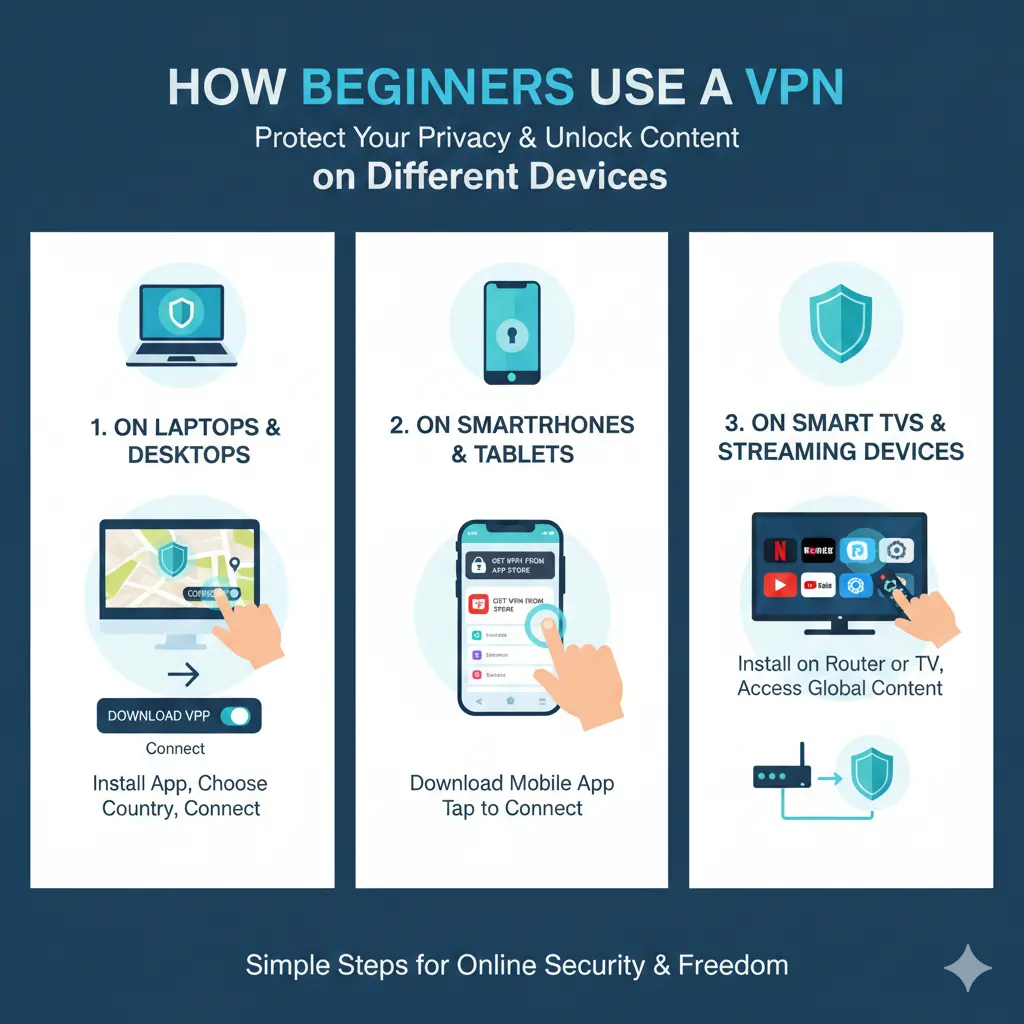
How Beginners Use a VPN on Different Devices
One of the most common concerns for first-time VPN users is whether a VPN
will work properly on their specific device.
The good news is that modern VPN services are designed to be beginner-friendly
across all major platforms, with minimal setup required.
Most beginners can install a VPN and connect securely in just a few minutes,
regardless of whether they use a computer, smartphone, or streaming device.
Using a VPN on Windows and macOS
For most beginners, laptops and desktop computers are the easiest place
to start using a VPN. Installation typically takes less than two minutes.
After installing the app, the process is straightforward:
- Sign in to your VPN account
- Press the connect button
- Browse the internet as normal
Beginner-friendly VPNs automatically select the fastest nearby server,
so there is no need to choose locations manually.
Providers such as NordVPN, Surfshark, and ExpressVPN
consistently perform well on desktop platforms.
Using a VPN on iPhone and Android
VPN apps on mobile devices are built with simplicity in mind.
Once installed from the App Store or Google Play,
the experience is very similar to desktop use.
Mobile VPNs are especially important for beginners who:
- Use public Wi-Fi in cafés, airports, or hotels
- Travel frequently or rely on mobile data
- Want to reduce mobile tracking and data exposure
Most beginner VPNs support automatic connection on untrusted Wi-Fi.
This means the VPN activates itself when you join public networks,
without requiring manual input.
Using a VPN on Firestick and Smart TVs
Streaming devices such as Amazon Firestick and Android TV
are increasingly popular with beginners.
Many leading VPN providers now offer dedicated TV apps
that function much like their mobile versions.
If you plan to stream on a TV, look for a VPN that offers:
- Native Firestick or Android TV apps
- Simple, remote-friendly interfaces
- Stable connections during long viewing sessions
For step-by-step setup instructions and tested recommendations,
see our Best VPNs for Firestick (2026) guide.
Do Beginners Need to Use a VPN on Every Device?
Not necessarily.
Many beginners start by using a VPN on one or two devices,
then expand their coverage as they become more comfortable.
VPNs that allow multiple or unlimited connections make this process easier,
especially for households with shared devices.
Providers like Surfshark and IPVanish are popular choices for this reason.
In the next section, we answer the most common beginner questions
about VPN safety, legality, and everyday use.
Beginner VPN FAQs
What is a VPN, and do beginners really need one?
A VPN (Virtual Private Network) encrypts your internet connection
and hides your real IP address.
For beginners, a VPN is useful because it protects personal data,
secures public Wi-Fi connections, and helps prevent tracking
by internet providers and advertisers.
Is using a VPN legal?
Yes, VPNs are legal in most countries.
Using a VPN does not make illegal activity legal,
but using one for privacy, security, and safe browsing
is completely lawful in the vast majority of regions.
Will a VPN slow down my internet?
A VPN may cause a small speed reduction due to encryption.
However, modern VPNs using protocols like WireGuard
are fast enough for streaming, video calls, gaming,
and everyday browsing without noticeable slowdown.
Is a free VPN good for beginners?
Free VPNs are generally not recommended for beginners.
They often include data limits, slower speeds, fewer servers,
and weaker privacy protections.
A low-cost paid VPN with a money-back guarantee
is usually a safer and more reliable option.
Do I need to keep my VPN on all the time?
For most beginners, leaving the VPN on is the safest option.
This ensures continuous protection,
especially when using public or shared Wi-Fi networks.
You can turn it off temporarily if needed,
but constant use provides the best overall security.
How many devices can I use with one VPN account?
This depends on the VPN provider.
Some services allow around 8–10 devices,
while others support unlimited simultaneous connections
on a single account.
Which VPN is easiest to use for beginners?
ExpressVPN is often considered the easiest VPN to use
due to its extremely simple interface.
NordVPN and Surfshark are also beginner-friendly,
offering a strong balance between simplicity,
features, and long-term value.
For broader comparisons, see our
Best VPN Services (2026)
guide or our
Best Cheap VPNs
breakdown for budget-focused options.
Which VPN Is Best for Beginners?
If you are new to VPNs, choosing the right provider matters more than
advanced features or technical controls.
The table below summarizes which VPN performs best for common beginner use cases,
based on ease of use, reliability, and long-term value.
| Use Case | Best VPN | Why It’s Best | Action |
|---|---|---|---|
| Best Overall for Beginners | NordVPN | Offers the best balance of simplicity, speed, and privacy. Works reliably for everyday browsing, streaming, and public Wi-Fi without requiring configuration. | Visit NordVPN |
| Best Budget VPN | Surfshark | Lowest long-term pricing with unlimited device connections. Well suited for beginners, families, and shared households. | Visit Surfshark |
| Best for Absolute Simplicity | ExpressVPN | Extremely clean interface with true one-click setup. Ideal for users who want zero decision-making. | Visit ExpressVPN |
| Best for Firestick & Smart TVs | IPVanish | Native Firestick support and unlimited connections. A practical choice for streaming-focused beginners. | Visit IPVanish |
| Best Low-Cost Entry VPN | PureVPN | Affordable plans for light browsing and basic privacy needs. Suitable for users testing VPNs for the first time. | Visit PureVPN |
If you want deeper feature-level comparisons, see our
Best VPN Services (2026) guide.
If pricing is your primary concern, our
Best Cheap VPNs (2026)
breakdown focuses on value-oriented options.
For beginners, the best VPN is the one you can install once
and rely on every day without confusion.
Stability, clarity, and trust matter far more than advanced settings.
Final Verdict: Which VPN Should Beginners Choose?
If this is your first time using a VPN, the most important factors are
ease of use, reliability, and safety.
You do not need advanced configurations or technical knowledge
to protect your privacy and secure your internet connection.
Based on hands-on testing, usability analysis, and long-term reliability,
the VPNs below stand out as the best choices for beginners in 2026.
Best Overall VPN for Beginners
NordVPN offers the best balance of simplicity, performance,
and security.
Its apps are easy to navigate, connections are stable,
and it performs reliably for streaming, everyday browsing,
and public Wi-Fi protection.
Beginners who want a true “set it and forget it” experience
without sacrificing quality will feel comfortable with NordVPN.
You can learn more in our
NordVPN review.
Best Budget VPN for Beginners
Surfshark is the strongest choice for beginners who prioritise affordability.
It is simple to use, supports unlimited device connections,
and offers excellent long-term value.
This makes Surfshark ideal for families, shared households,
or users who want VPN protection across multiple devices.
See our full analysis in the
Surfshark review.
Best VPN for Absolute Simplicity
ExpressVPN remains the easiest VPN to use.
Its clean interface, true one-click connection,
and consistent app design across devices make it ideal
for users who want minimal decision-making.
While it is more expensive than most competitors,
beginners who value simplicity above all else
often appreciate its polished and predictable experience.
Full details are available in our
ExpressVPN review.
If you are unsure where to start, choose one of the VPNs above
and test it during the refund period.
All recommended providers include money-back guarantees,
allowing beginners to try a VPN risk-free.
For broader comparisons, visit our
Best VPN Services (2026) guide.
If pricing is your primary concern,
our Best Cheap VPNs (2026)
page explains affordable options in more detail.
Related VPN Guides
Explore more expert VPN guides based on your needs.
All pages below are regularly tested and updated for 2026.
| Category | Guide |
|---|---|
| Best VPN Guides | Best VPN Services (2026) |
| Privacy & Security | Best No-Log VPNs (2026) |
| Beginner Friendly | Best VPN for Beginners (2026) |
| Streaming | Best VPNs for Streaming |
| Live Sports | Best VPNs for Live Sports |
| Netflix | Best VPNs for Netflix |
| Budget | Best Cheap VPNs |
| Gaming | Best VPNs for Gaming |
| Low Ping | Best Gaming VPNs for Low Ping |
| Public Wi-Fi | Best VPNs for Public Wi-Fi |
| Living Abroad | Best VPNs for Expats Living Abroad |
| Restricted Regions | VPNs for Restricted Networks |
| Firestick | Best VPNs for Firestick |